 |
|
YouTrack is a hosted solution that provides a way for us to track "Open", "In Progress" and "Fixed" issues, represented by Cards, by moving them between 3 columns.
Here's what it looks like:
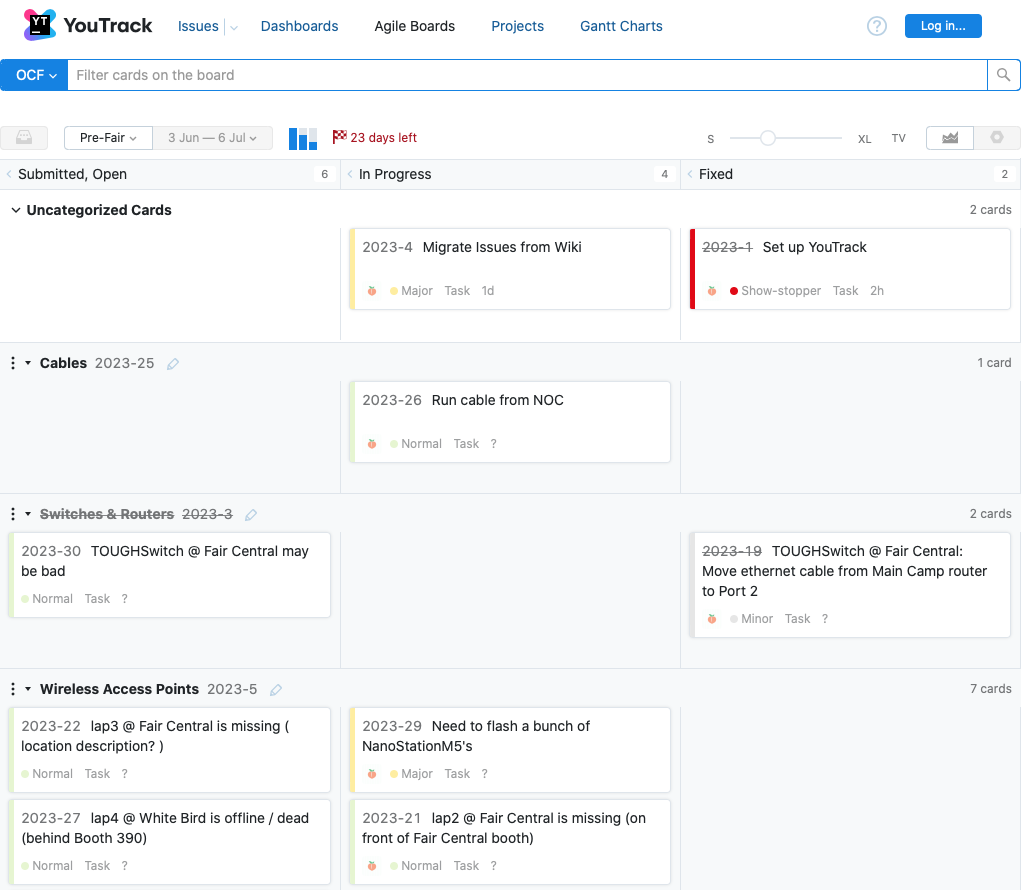 For read-only access, click the
  button after clicking: https://ocfit.youtrack.cloud/agiles
To obtain a login, email Clif or I and we can send you an invite.
Here's how it works, in a nutshell:
A Card represents an Issue that needs to be resolved (aka Fixed). A Card can be moved between three states: "Submitted, Open" <--> "In Progress" <--> "Fixed".
1) You can create a new Issue (Card) under one of 4 "swimlane" categories ( Cables, Switches & Routers, Wireless Access Points, and Outage ). An Issue Card can also be created under "Uncategorized Cards" if it doesn't fit any of those 4 categories. Mouse over the (+) in the appropriate swimlane of the "Submitted, Open" (leftmost) column and "New Card..." will appear. Give the Card a short Summary and a more detailed Description. There is also a field for an IP address if that's applicable. An Issue Card defaults to a Priority of "Normal" ( vs. Minor, Major, Show-Stopper, etc. )
2) If/when you want to commit to work on / resolve a particular Issue, first assign yourself to its Card. For example Issue 2023-30:
button after clicking: https://ocfit.youtrack.cloud/agiles
To obtain a login, email Clif or I and we can send you an invite.
Here's how it works, in a nutshell:
A Card represents an Issue that needs to be resolved (aka Fixed). A Card can be moved between three states: "Submitted, Open" <--> "In Progress" <--> "Fixed".
1) You can create a new Issue (Card) under one of 4 "swimlane" categories ( Cables, Switches & Routers, Wireless Access Points, and Outage ). An Issue Card can also be created under "Uncategorized Cards" if it doesn't fit any of those 4 categories. Mouse over the (+) in the appropriate swimlane of the "Submitted, Open" (leftmost) column and "New Card..." will appear. Give the Card a short Summary and a more detailed Description. There is also a field for an IP address if that's applicable. An Issue Card defaults to a Priority of "Normal" ( vs. Minor, Major, Show-Stopper, etc. )
2) If/when you want to commit to work on / resolve a particular Issue, first assign yourself to its Card. For example Issue 2023-30:
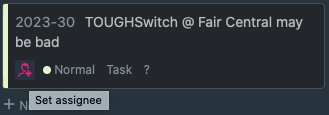 Click on the magenta icon with the + to assign yourself. You can leave the Card in the Open column, meaning you've committed to working on it but you haven't started working on it yet. Or, drag the Card to the middle "In Progress" column to show you're working on it. Revise the Description as needed but otherwise use the Comment section to make notes as you go.
3) When you resolve (aka "Fix") an Issue, move its Card to the "Fixed" column and congratulate yourself! Bit off more than you can chew? Then click the red icon with the + and choose "Unassigned" on the Card. Ideally there aren't unassigned Cards in the "In Progress" column, so also drag it back to "Submitted, Open" for someone else to take it on.
4) If you learn something that can help others, create a new Article in the Knowledge Base. It can be helpful to include a link to the related Article(s) in the Description or Comment section of an Issue Card. For example: 2023-A-3 Failure to parse luci config (for OpenWRT web UI) after updating OpenWRT version
HINT: Click on "Agile Boards" at the top of the screen to return to the 3 column view of Cards.
YouTrack is meant to be a lightweight process for us to coordinate our efforts. There is also the wiki page https://camas.ocfit.org/wiki/bin/view/OCF/ToDo2023 which you can use if you'd rather edit a wiki. I will create new Cards in YouTrack for Issues added to the wiki page if and when I notice them.
Click on the magenta icon with the + to assign yourself. You can leave the Card in the Open column, meaning you've committed to working on it but you haven't started working on it yet. Or, drag the Card to the middle "In Progress" column to show you're working on it. Revise the Description as needed but otherwise use the Comment section to make notes as you go.
3) When you resolve (aka "Fix") an Issue, move its Card to the "Fixed" column and congratulate yourself! Bit off more than you can chew? Then click the red icon with the + and choose "Unassigned" on the Card. Ideally there aren't unassigned Cards in the "In Progress" column, so also drag it back to "Submitted, Open" for someone else to take it on.
4) If you learn something that can help others, create a new Article in the Knowledge Base. It can be helpful to include a link to the related Article(s) in the Description or Comment section of an Issue Card. For example: 2023-A-3 Failure to parse luci config (for OpenWRT web UI) after updating OpenWRT version
HINT: Click on "Agile Boards" at the top of the screen to return to the 3 column view of Cards.
YouTrack is meant to be a lightweight process for us to coordinate our efforts. There is also the wiki page https://camas.ocfit.org/wiki/bin/view/OCF/ToDo2023 which you can use if you'd rather edit a wiki. I will create new Cards in YouTrack for Issues added to the wiki page if and when I notice them.
For read-only access, click the button after clicking: https://ocfit.youtrack.cloud/agiles
To obtain a login, email Clif or I and we can send you an invite.
Here's how it works, in a nutshell:
A Card represents an Issue that needs to be resolved (aka Fixed). A Card can be moved between three states: "Submitted, Open" <--> "In Progress" <--> "Fixed".
1) You can create a new Issue (Card) under one of 4 "swimlane" categories ( Cables, Switches & Routers, Wireless Access Points, and Outage ). An Issue Card can also be created under "Uncategorized Cards" if it doesn't fit any of those 4 categories. Mouse over the (+) in the appropriate swimlane of the "Submitted, Open" (leftmost) column and "New Card..." will appear. Give the Card a short Summary and a more detailed Description. There is also a field for an IP address if that's applicable. An Issue Card defaults to a Priority of "Normal" ( vs. Minor, Major, Show-Stopper, etc. )
2) If/when you want to commit to work on / resolve a particular Issue, first assign yourself to its Card. For example Issue 2023-30:
Click on the magenta icon with the + to assign yourself. You can leave the Card in the Open column, meaning you've committed to working on it but you haven't started working on it yet. Or, drag the Card to the middle "In Progress" column to show you're working on it. Revise the Description as needed but otherwise use the Comment section to make notes as you go.
3) When you resolve (aka "Fix") an Issue, move its Card to the "Fixed" column and congratulate yourself! Bit off more than you can chew? Then click the red icon with the + and choose "Unassigned" on the Card. Ideally there aren't unassigned Cards in the "In Progress" column, so also drag it back to "Submitted, Open" for someone else to take it on.
4) If you learn something that can help others, create a new Article in the Knowledge Base. It can be helpful to include a link to the related Article(s) in the Description or Comment section of an Issue Card. For example: 2023-A-3 Failure to parse luci config (for OpenWRT web UI) after updating OpenWRT version
HINT: Click on "Agile Boards" at the top of the screen to return to the 3 column view of Cards.
YouTrack is meant to be a lightweight process for us to coordinate our efforts. There is also the wiki page https://camas.ocfit.org/wiki/bin/view/OCF/ToDo2023 which you can use if you'd rather edit a wiki. I will create new Cards in YouTrack for Issues added to the wiki page if and when I notice them. 


Edit | Attach | Print version | History: r1 | Backlinks | View wiki text | Edit wiki text | More topic actions
Topic revision: r1 - 2023 Jun 12, gryphon


 Main
Main



 Copyright © by the contributing authors. All material on this collaboration platform is the property of the contributing authors.
 Ideas, requests, problems regarding Foswiki? Send feedback